Turo Fleet Management That Gets Every Car Cleaned Before the Next Trip
Your bookings set each car's cleaning deadline, and your cleaners are asked by email automatically. You stop chasing people, no guest gets a dirty car, and you see what every car really makes after costs.
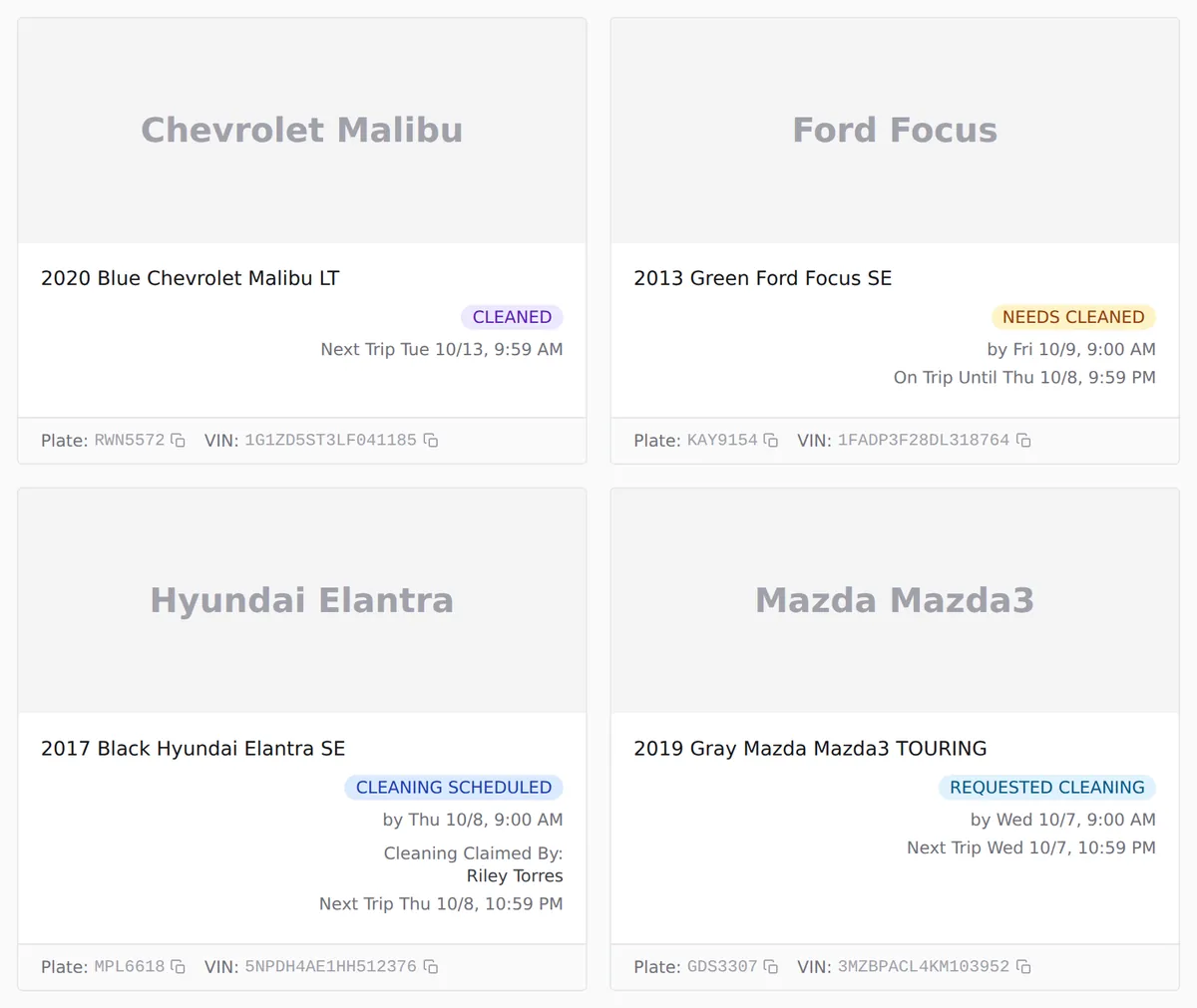
Every car's state at a glance. Demo fleet, made-up data.
Less Time Coordinating Cleaners
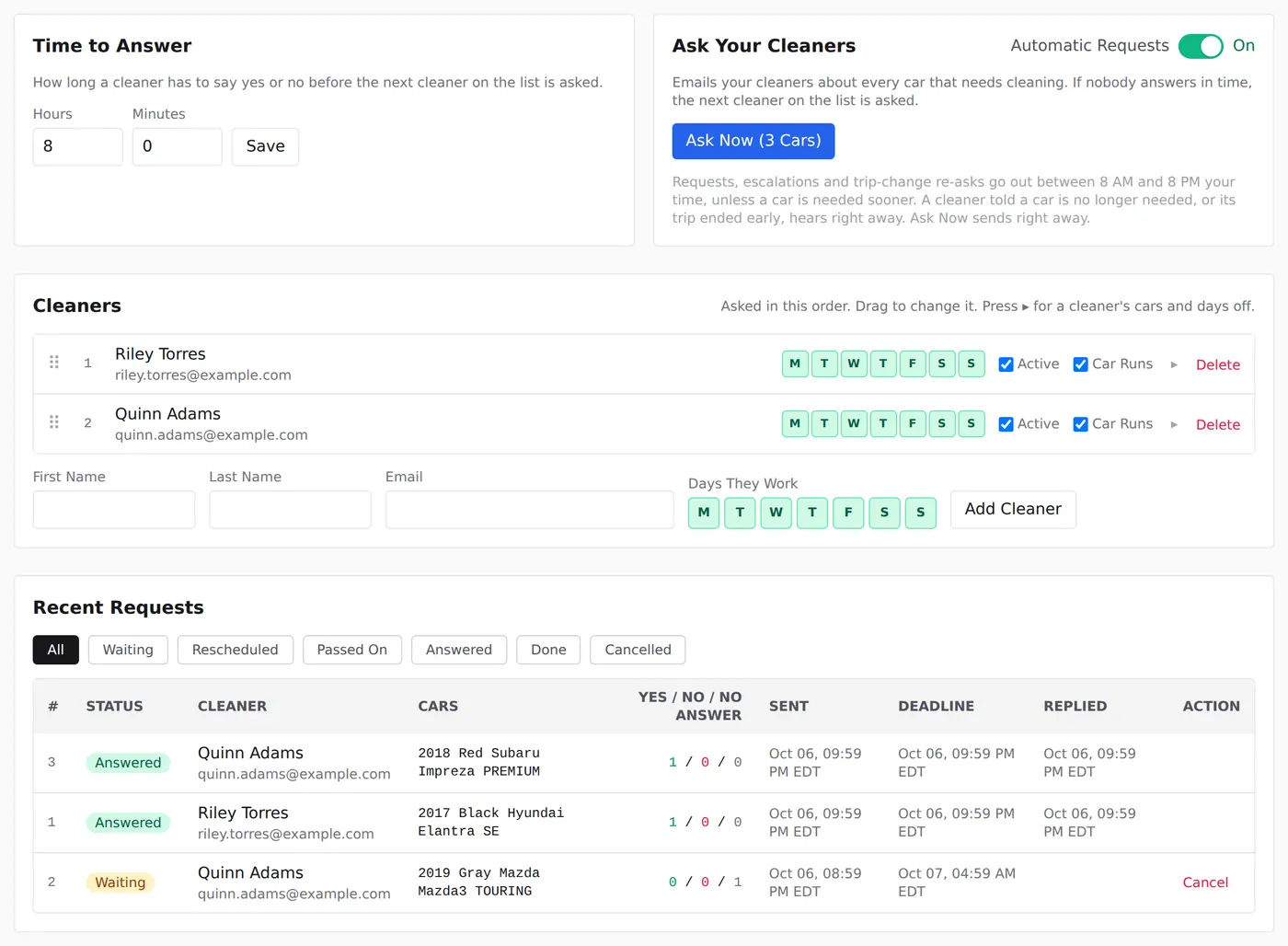
Requests go out the moment a car needs cleaning, one cleaner after another until someone says yes. No group texts at 9 PM.
No Missed Cleanings Before Trips
Every car has a clean-by time from its next booking, and a car running late is flagged on your dashboard while there is still time to act.
Real Profit per Car
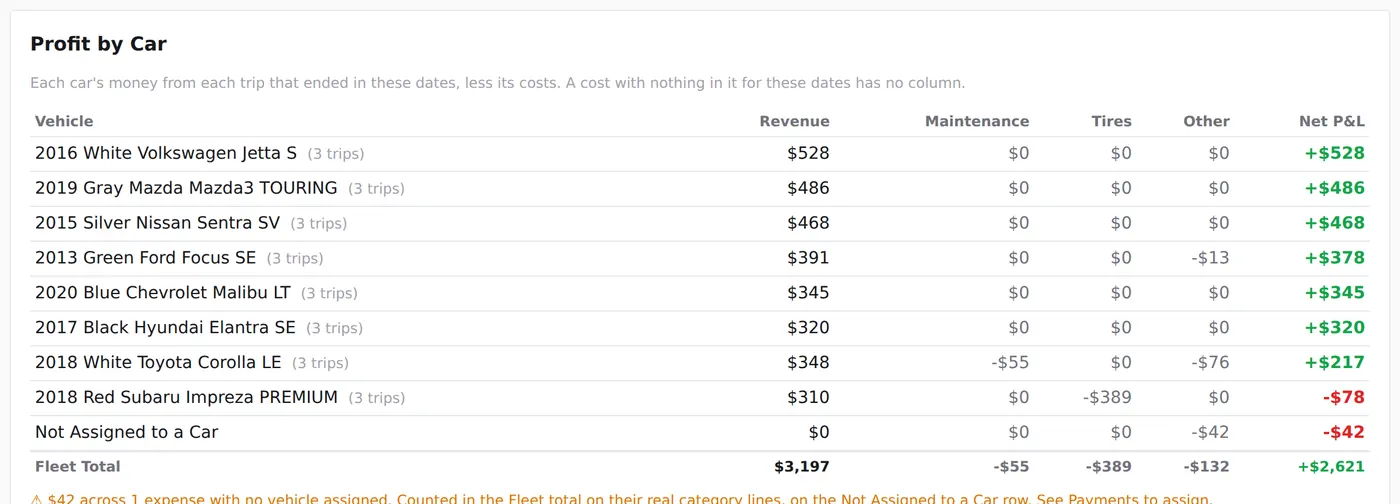
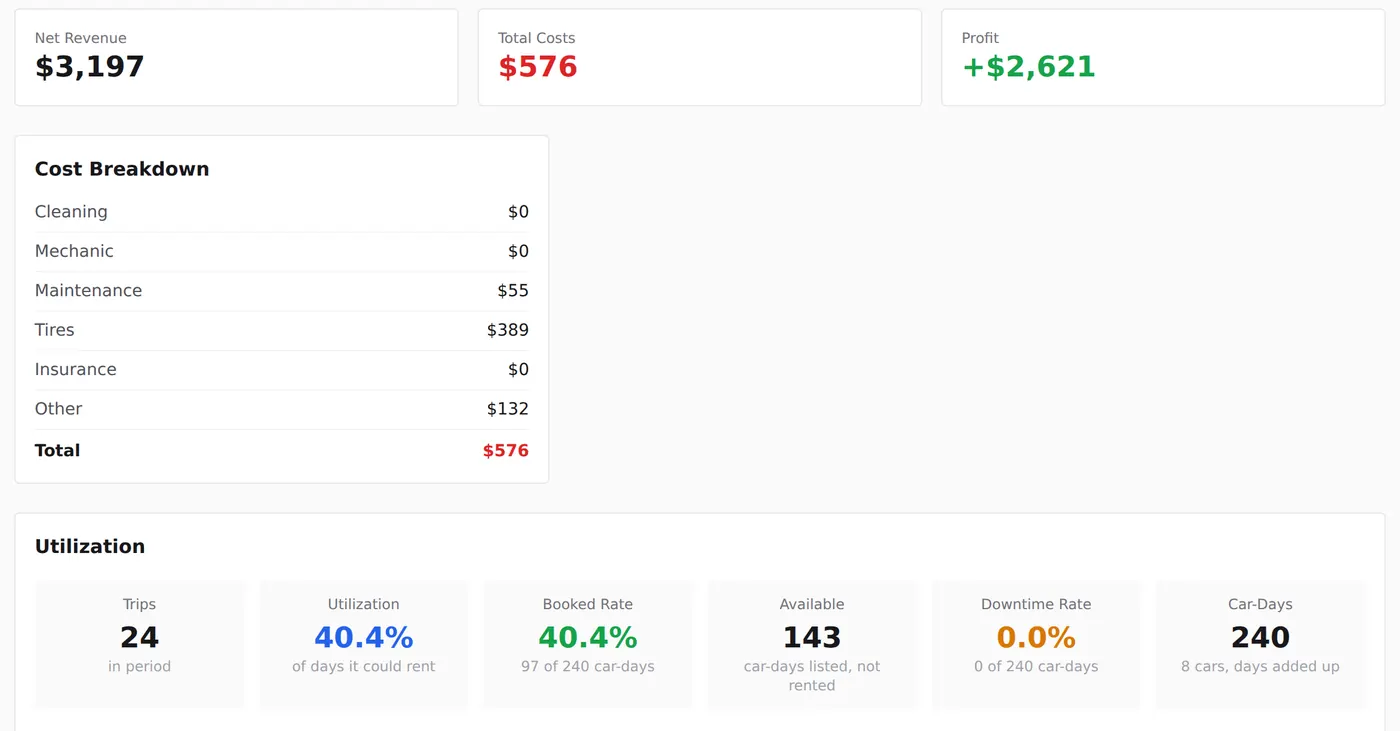
Trip income less cleaning, repairs, tires and other costs, car by car. The one losing money stops hiding in the fleet average.
Getting Started
Get Started in Three Steps
Set it up once, then it runs from your bookings.
Add Your Cars
Type a VIN and the year, make and model fill in. On Turo, upload your earnings file and every car comes in with its past trips.
Bring In Your Bookings
Connect Gmail read only, or forward Turo's trip emails with one Gmail or Outlook rule. Private rentals and your own bookings go in from the Trips tab.
Add Your Cleaners
A name and an email address is all it takes. From then on they are asked by email whenever a car needs them.
Cleaning
Turo Host Cleaning and Cleaner Scheduling, Handled
Automatic Cleaner Requests by Email
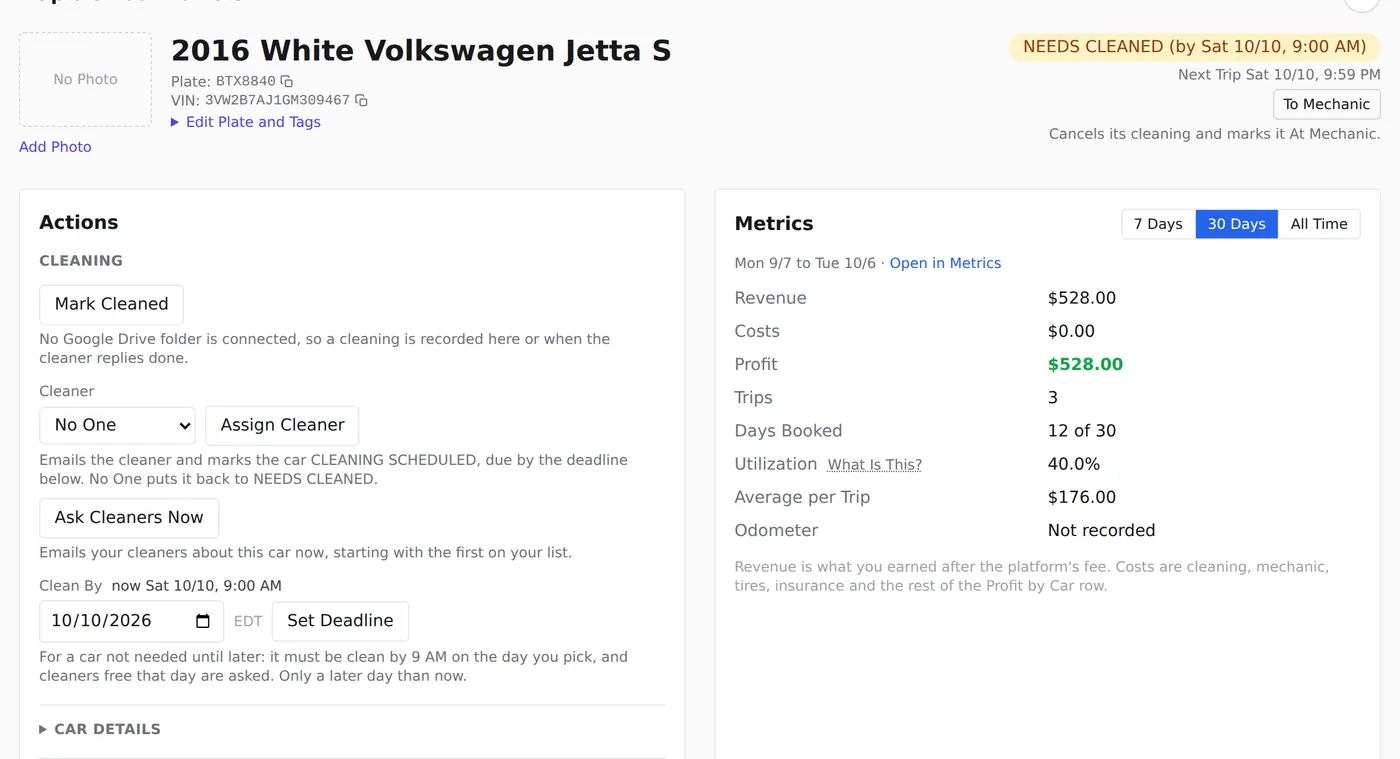
Cleaners are emailed one at a time, in the order you set, and whoever says yes gets the car, so a request never sits waiting on one person. They reply in their own words, with no app to install and no account to make.
Cleaning Deadlines From Your Bookings
Each cleaning is due by the next guest's pickup, or 9 AM the next morning if that is sooner, so nobody has to guess how much time there is.
A Dashboard of Every Car
NEEDS CLEANED, CLEANING SCHEDULED or CLEANED, with who claimed it and when the next trip starts, so one look tells you which cars are ready.
One Schedule for the Week
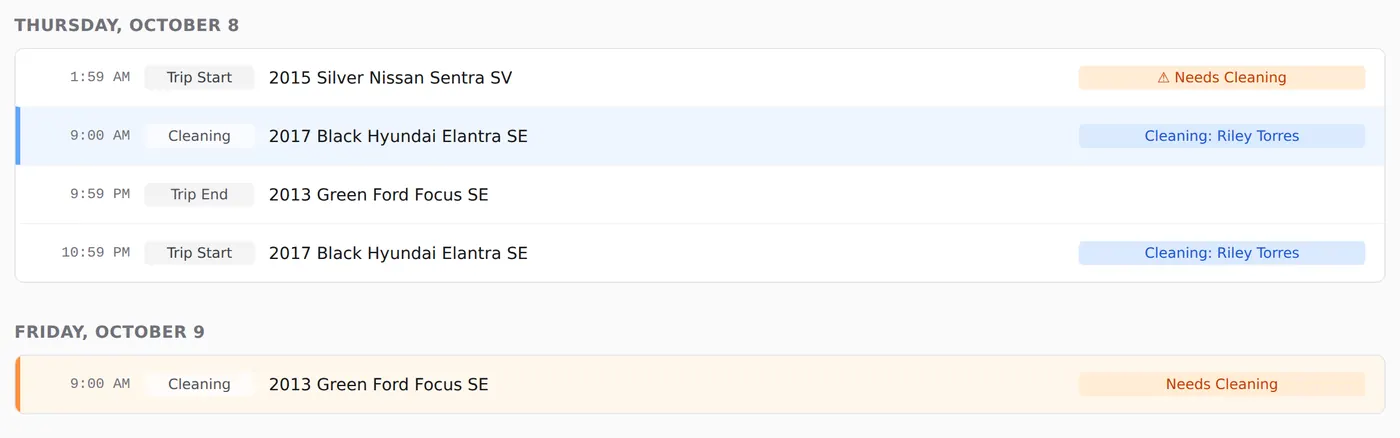
Trip starts, trip ends and cleanings by day and time, so a tight turnaround shows up days before it becomes a problem.
Money
See What Each Car Really Earns
Profit per Car and Utilization
Revenue, costs and profit for each car, plus the share of days it was booked, so you know which cars to keep, reprice or sell.
Turo Payout Tracking
Turo's payout emails are read as they arrive, so you can see what you earned this month, what has been paid out and what Turo still owes you.
Invoices Filed to the Right Car
Upload a shop invoice as a PDF or a phone photo. It is read for you and filed against the car it names, so repair costs land in that car's profit without retyping.
Cleaner Payments and 1099s
Record what you pay each cleaner and your mechanic, and see what each one is still owed. At year end, each cleaner's total and the 1099-NEC export are ready.
Cars and Trips
Damage Claims, Mechanics and GPS in One Place
Trip Photo Zips for Damage Claims
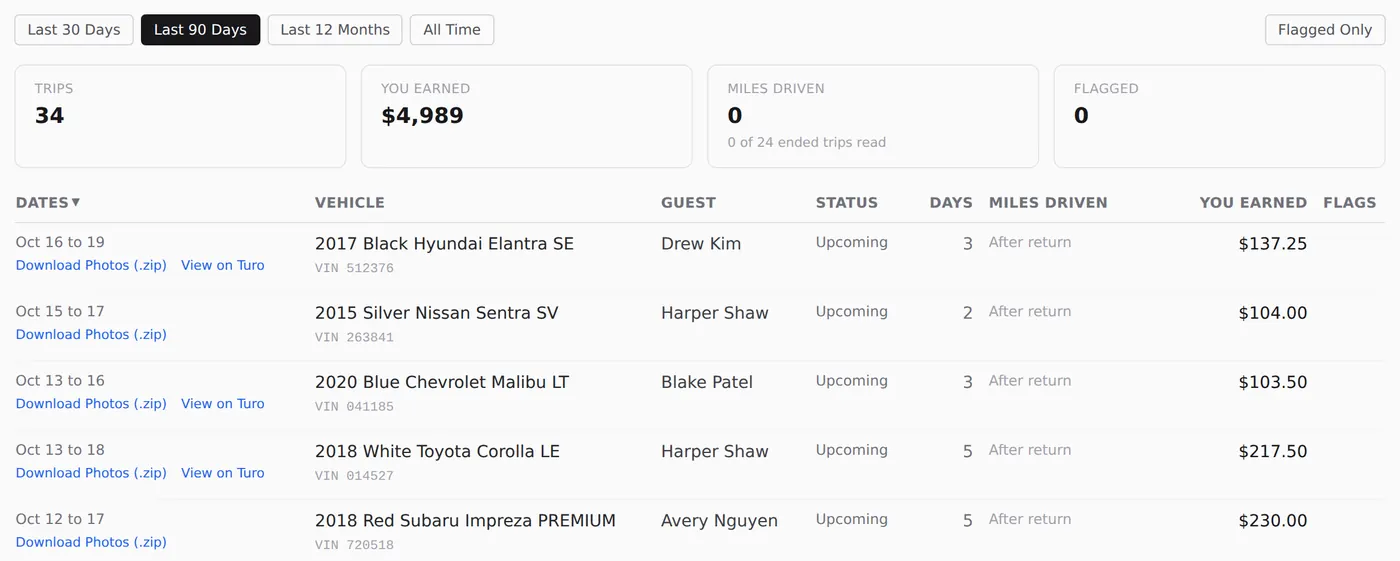
One button downloads the photos your cleaner took before a trip's pickup, as the original files with their time stamps intact, ready to attach to a claim.
Mechanic Dispatch With a Runner
Send a car to the mechanic in one step: its cleaning is called off and a runner is asked by email to drive it over, and again when it is ready to come back, so you are not the driver.
GPS With Bouncie
Connect your Bouncie units to see where each car is and get check-engine codes on its page before a guest reports them.
Add a Car by VIN
Type the VIN and the year, make and model fill in, so a new car is ready for its first booking in a minute.
Team
Bring Your Co-Host and Virtual Assistant
Invite a Co-host with full control, or a Virtual Assistant (VA) for the day-to-day, each with their own login and role. Someone who works for two hosts switches between fleets with one login.
Turo Integration
Turo, Private Rentals and Your Own Bookings
Turo trips come in from the emails Turo already sends you. We never ask for your Turo password and never sign in to your Turo account. Private rentals and direct bookings go in from the Trips tab, with what the renter paid, and count in the same profit numbers.
Pricing
Per Car, and Cheaper as You Grow
Start with 14 days free. No card is needed to sign up, and nothing is charged until you choose to subscribe. Billed monthly in US dollars, for US-based fleets.
Solo
Cars 1 to 5
$15 per car / month
Fleet
Cars 6 to 20
$12 per car / month
Shop
Cars 21 and Beyond
$10 per car / month
Each band applies only to the cars in it. A twelve-car fleet pays $15 for the first 5 and $12 for the next 7, so $159 a month, or $13.25 a car.
A car stops counting the moment you delete or disable it. The rest of that month comes back as a credit on your next bill, never as cash. A car you add or switch back on is charged for the rest of the month. If you remove your last car, your subscription ends when the period you paid for runs out; add a car before then and it carries on.
- Each car gets one free trial.
- Cancel within 30 days of your first payment and it is refunded automatically.
- Cancel whenever. Your data is yours to export on the way out.

About
Built by a Turo Host for His Own Fleet
I'm Taylor, a principal software engineer who runs a Turo fleet. Once I had enough cars that the spreadsheet stopped working and the group chat with my cleaner stopped being a system, I built this.
The hard part of hosting was never the listing. It is the car that comes back at 9 PM with a trip at 8 AM, the receipt you cannot find in April, and the one car quietly losing money. This handles those, and it runs my fleet every day.
Questions Hosts Ask
Do you need my Turo login or cookies?
No. We never ask for your Turo login or browser cookies, and nothing here signs in to, reads or changes your Turo account. Trips come from your booking emails (forwarded, or read from Gmail), an earnings file you upload, or bookings you type in.
Do my bookings have to come from a platform?
No. Type any booking in with Manually Enter a Booking on the Trips tab, with its amount for per-car profit. For Turo bookings, the trip emails you forward add them for you. Nothing syncs with rental sites or calendars.
I co-host. Does it work for me?
Yes. The owner invites you into their fleet as a Co-host from the Team tab, or you start the fleet yourself for an owner who isn't on the site yet and invite them to claim it. If you work for more than one host, one login switches between their fleets.
How are cleaners asked?
When a trip ends, the car needs cleaning by the next guest's pickup, or 9 AM the next morning if that is sooner. Your cleaners are emailed one at a time in the order on the Cleaning tab (drag to change it). They reply in their own words, and whoever says yes gets it.
How is a cleaning recorded?
Without Google Drive, any one of these: the cleaner replies done to their Cleaning confirmed email, the cleaner presses Mark Done, or you press Mark Cleaned on the car's page. It counts only after the trip has ended. With Google Drive, only photos count: see how.
How long is the free trial?
14 days from the day you create your fleet, and no card is needed. It's one trial per car: see what that means.
How do I cancel?
On Billing, press Manage Subscription and cancel there; you won't be charged again. The fleet keeps working to the end of the period you paid for, and your data stays. Within 30 days of your first payment, cancelling ends the subscription that day and refunds that payment automatically (see refunds). Only the fleet owner can cancel.
Can I get my data out?
Yes, any time. Fleet Settings, Download Export gives one ZIP of your records plus every receipt, document and photo you uploaded. Owners and Co-hosts can download it, even after the subscription lapses.
Try It on Your Own Fleet
14 days free. No card needed to sign up. Add your cars and cleaners, and your next booking does the rest.